Project
Lookout
Custom camera detectors, trained in the browser from a few example photos
Feel free to share my work. I'd really appreciate it, because I don't tend to share it enough myself.
- Role
- Status
- 3
- ~170KB
- 85MB → 10MB
What it does
Lookout lets you build your own camera detector in the browser. You describe what it should notice, name the groups it should tell apart, such as “I'm at my desk” and “Desk is empty”, and give it some example photos from the webcam or from files. Training takes a few seconds, and then you can point the camera at the subject and watch the confidence for each group change live.
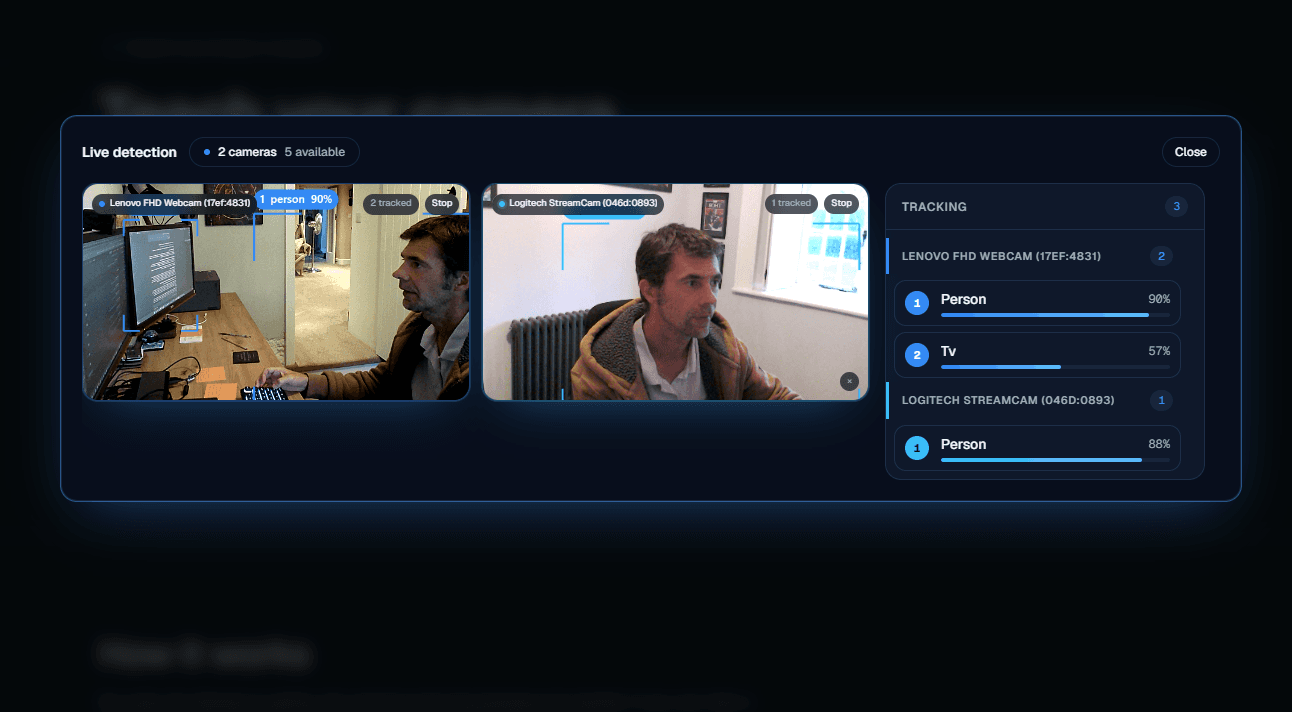
When the detector sees what it was trained for, it can speak, show a banner or a browser notification, or send a message to Slack, Discord, a webhook or an email address. The homepage also has a live demo that picks out around 80 everyday objects across one or more cameras, without any training.
Training in the browser
Training happens in the page. A MobileNet model turns each photo into a list of 1,280 numbers, and a small classifier is trained on those with TensorFlow.js. It's the same approach Google's Teachable Machine uses, and it runs on your own GPU, so the photos don't have to be uploaded to train it.
Reviewing the photos is optional. Claude Haiku 4.5 looks at the ones you ask it to check and flags any that seem to be in the wrong group, so you only need to look at those.
The Show what it's looking at switch highlights the part of the picture that affected the result. I only wanted it if it would work reliably on different devices. It reuses the grid of regional features MobileNet already works out for each frame, so it adds very little work, and the switch is hidden if those features aren't available.
More than one camera
The multi-camera rules came out of testing a detector for “I've left my desk”. If one camera can see me and another can't, or can only see half of me, what should happen?
Each camera votes yes or no, or abstains when it isn't confident either way, so a camera that only sees half a person doesn't count as a no. You choose whether any camera or every camera has to agree. Scores are averaged over about a second, the condition has to hold for a set time before anything fires, and a cooldown stops it repeating. If every camera is unsure at the same moment, that timer pauses instead of starting again.
A better live demo
The live demo started out on TensorFlow.js COCO-SSD. It missed small and distant objects, and its more accurate model brought the download to about 85MB. I added Google's MediaPipe detector as an optional switch to compare the two, and it was so much better that I made it the only option. It's about 10MB in total, runs on the GPU and falls back to the CPU when it has to.
Accounts, sharing and not losing work
Detectors are saved in the browser as you work. An optional Supabase account backs them up so you can restore them on another machine, with row-level security on every table and a private storage bucket. Backup and restore only happen when you press the button, so nothing gets overwritten without you choosing it.
While testing, I backed up a detector in Chrome, signed in on Edge and found nothing there. The backup was safe, but the page gave no sign that it existed. Looking into it also showed that restoring could replace a local copy holding more photos than the backup. Now the page shows which backups aren't on the current browser, and both backup and restore compare photo counts and warn you before replacing anything.
A detector can also be shared as a link that runs on someone else's phone or laptop without an account. The trained model is stored at 8 bits per weight, which is about 170KB, and its scores stay within 1% of the original. Your photos and your Slack, Discord, webhook and email settings aren't included.
How it's built
Next.js, TypeScript and Tailwind on Vercel, with TensorFlow.js and MediaPipe for the models, Claude through the Anthropic SDK for labelling, and Supabase for accounts and storage. Messages to Slack, Discord, webhooks and email go through a server route, so their URLs and keys stay off the page, and webhooks pointing at private network addresses are refused.
I built it with Claude Code over three days, making the decisions and testing each part as it went. The code is public on GitHub.
Getting found, and staying out of the way
Lookout is a small site, so the search side is straightforward: a sitemap, canonical URLs, share cards, and an FAQ on the homepage marked up in JSON-LD along with the product itself. That way an assistant asked how to train a camera detector in the browser has something structured to read rather than guessing from the layout.
The more useful decision was what to keep out. A shared run link carries someone else's group names and is meant for the person it was sent to, so those pages are marked noindex and the robots file tells crawlers not to fetch them at all. The API routes are shut out the same way. Being findable matters for the homepage, not for everything.
Built with
Next
A flight recorder for AI agents, with real recorded runs you can play back and branch